
- 1
Open the bot and press Start
Press Start in Telegram. The FOMAFIA bot opens; press Start. It replies with a one-time login link. Tap Open FOMAFIA.
- 2
Create a trading wallet
On the Dashboard, the checklist shows Create wallet. One click makes a Solana wallet that is used only for your copies.
- 3
Deposit SOL
Copy the wallet address or scan the QR code and send SOL from Phantom, Solflare or an exchange. The balance updates by itself seconds after the transfer lands.
- 4
Pick a trader
Open FOMO Wallets. Traders are ranked by PnL over 24H, 7D and 30D. Press Copy next to the one you like.
- 5
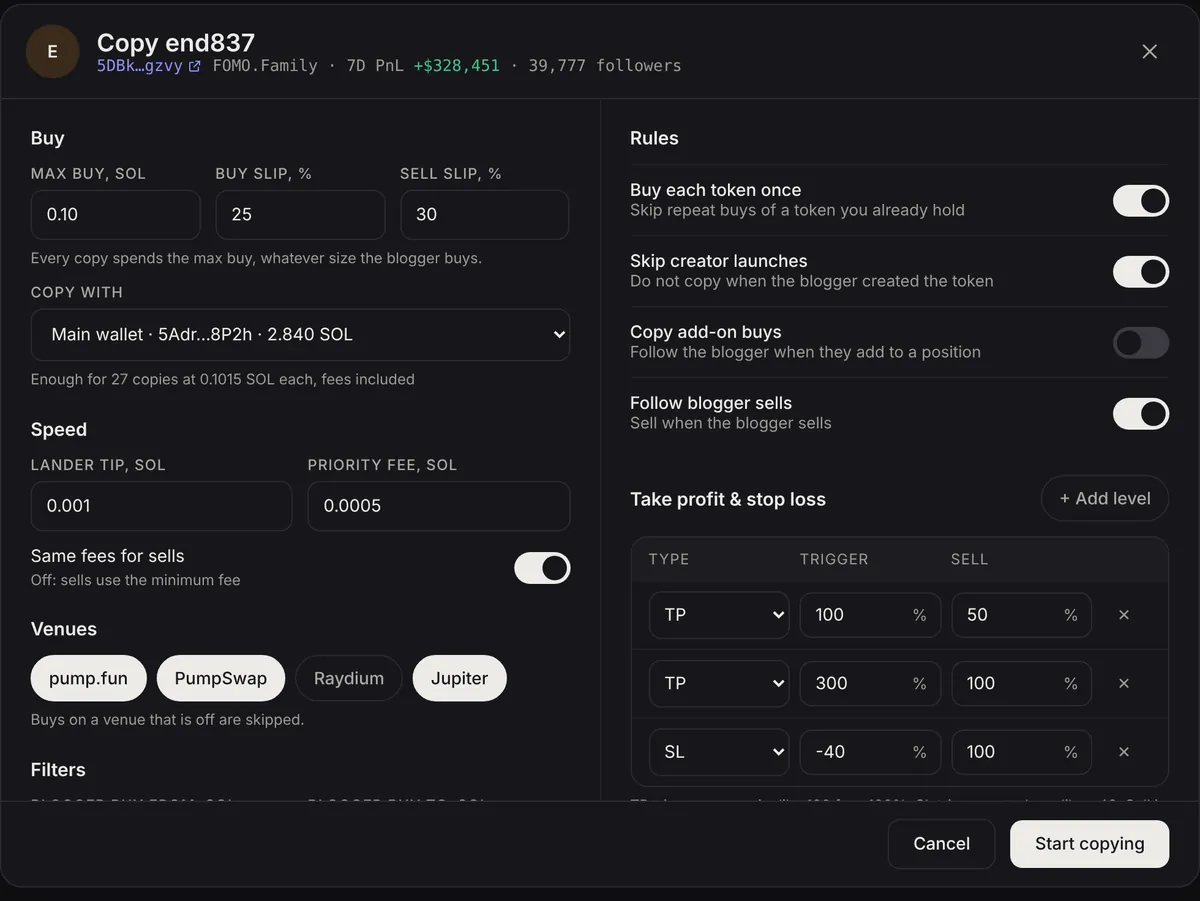
Set your limits and start
Choose the max buy per copy, the wallet, and take profit or stop loss. Press Start copying.
- 6
Watch the first copy land
The next time that trader buys, the copy appears in Live activity on the Dashboard and in Telegram, with a Solscan link.
How much SOL do I need?
Each copy spends your max buy plus about 0.0015 SOL in tip and priority fee, and roughly 0.002 SOL of token-account rent on a new token (returned when the position is fully sold). With a 0.1 SOL max buy, 0.5 SOL in the wallet is enough for four copies.
The copy settings screen shows how many copies your balance covers before you start.